
Features
Everything M-Agent does, explained in full. If you want step by step setup instructions instead, see How It Works.
One Dashboard For Every Network
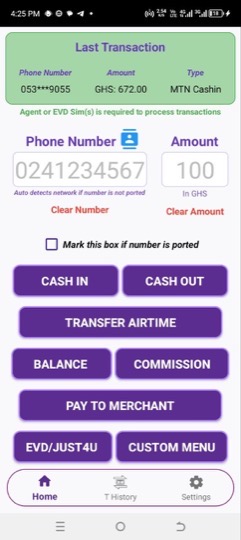
M-Agent puts MTN, Telecel and AirtelTigo on a single screen. Enter the number and the amount, tap the transaction, and M-Agent works out which network the number belongs to and dials accordingly.
There are no short codes to memorise and nothing to switch between customers. If a number has been ported, tick the box and M-Agent uses the network you specify instead.
By default, Cash In, Cash Out, Transfer Airtime, Balance, Commission, Pay To Merchant, EVD and Just4U all sit on that one screen, beside the Custom Menu button. You can swap them around or replace them with your own menus, see Dashboard Customization.
Smart Navigation
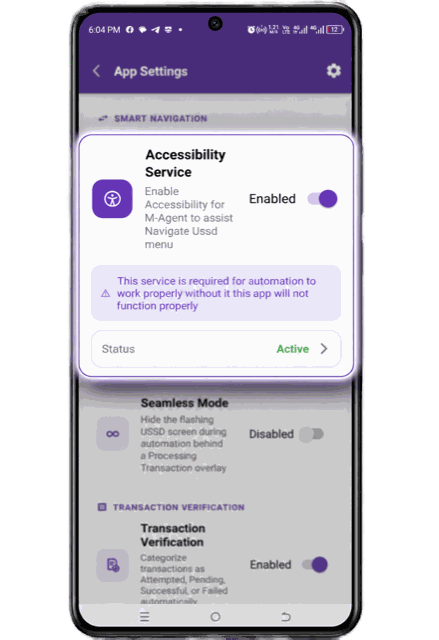
Smart Navigation is what moves through the menu on your behalf. You confirm the details once, and M-Agent handles the steps that used to be tapped by hand.
At the PIN stage it stops and hands control back to you. By default, you enter your PIN yourself and the app never sees, stores, or touches it. Fingerprint Verification is available as an option in Seamless Mode. Terms and conditions apply.
Seamless Mode
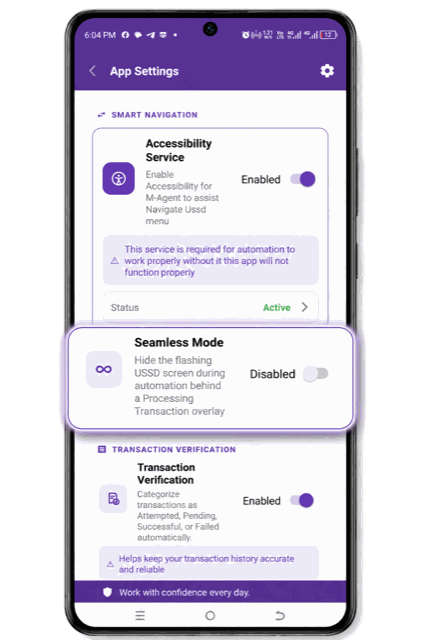
While the menu runs, the phone's own screens flash on and off. Seamless Mode hides them behind a single Processing Transaction overlay, so the customer sees one calm screen and you have nothing to tap by mistake.
Contact Picker and Number Suggestions
Tap the contact icon above the number field to pull a customer straight from your saved contacts.
For customers who are not saved, Suggest (RC) Numbers offers your Regular Customers once you have typed five characters, and shows the customer’s name before you send. It needs Transaction Verification turned on. Either way, the number is entered correctly once and reused after that.
Regular Customers
M-Agent remembers the customers you serve again and again. A number becomes a Regular Customer once it has three successful transactions, or has been served on three different days. This needs Transaction Verification turned on.
Regular Customers are what Suggest (RC) Numbers offers as you type, with the customer’s name shown before you send. Open Regular Customers in App Settings to search them, or remove a number you no longer want suggested.
Complete Transaction History
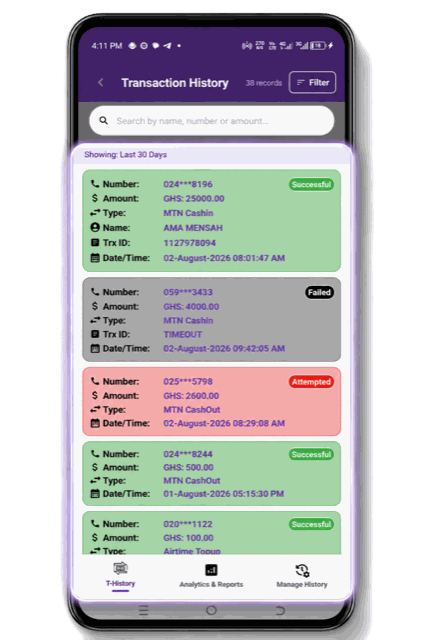
Every transaction is recorded automatically, with the customer name, phone number, amount, transaction type, transaction ID, and the date and time.
Search by name, number, or amount. Filter by transaction type, by status, and by date range, whether that is today, the last seven days, the last thirty, or dates you pick yourself.
Tap a record to open it and copy the customer's number or the transaction ID straight from the dialog.
This is what replaces the notebook. There is nothing to write, nothing to lose, and nothing to decipher later.
Transaction Verification
Every record carries a status, shown in colour.
-
Attempted
Manually cancelled, or the network dropped before the transaction reached the pending stage.
-
Pending
Processed on your side, waiting for the network to confirm.
-
Successful
Confirmed by the network.
-
Failed
No confirmation arrived within fifteen minutes, or the confirmation reported a failure.
Telecel Cash Out is the one transaction the customer completes on their own phone. For those, M-Agent sends you a notification once it has recorded and verified the transaction, whether the app is open or in the background.
Message content is never stored, shared, or read by the app. It is used only to determine whether a transaction succeeded or failed.
If a record was not verified automatically, press and hold it to try again. If it still cannot be verified, you are offered the option to mark it Successful yourself. A transaction M-Agent has already verified from a network confirmation cannot be changed manually.
Analytics and Reports
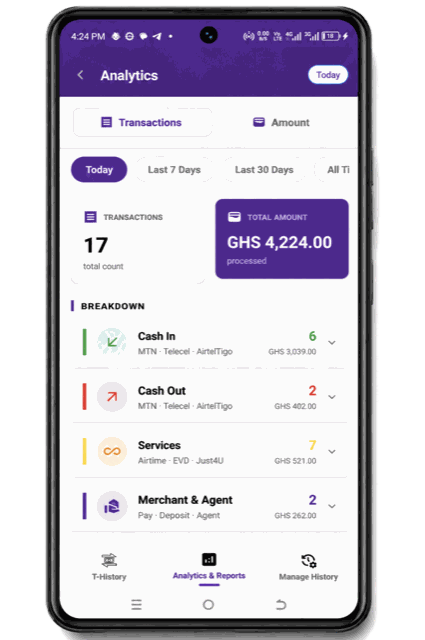
See your transaction count and your total value for today, the last seven days, the last thirty days, or all time.
Underneath, your activity is broken down into Cash In, Cash Out, Services covering Airtime, EVD and Just4U, and Merchant and Agent covering Pay, Deposit and Agent transfers. Tap any group to expand it and see the individual items inside.
Custom Menu Builder
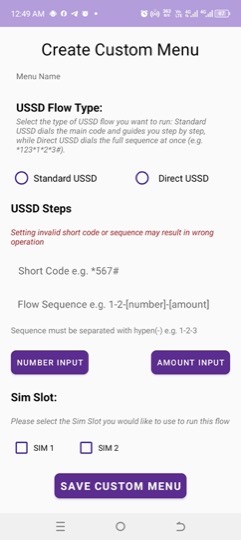
Build a menu for any workflow M-Agent does not cover by default.
Name it, choose whether it is a standard flow with a short code followed by menu steps, or a direct flow dialled in one string, then set the sequence and choose the SIM slot. Placeholders drop the customer's number and the transaction amount into the right positions at the moment of the transaction.
Once saved, it appears in your Custom Menu list, opened from the Custom Menu button on the home screen, and runs as fast as any built in option. You can also put it on a home screen button with Dashboard Customization. Press and hold it in the list to edit or delete it.
Operation Pool
Ready-made operations that ship with M-Agent and run like the built in buttons: Move Float to Working, Move Working to Float, Move Commission to Float and Telecel Agent Balance for Telecel Cash, and Yellow Currency (YC) Airtime.
Open it from the Custom Menu button. Each operation explains what it does, which SIM it uses, what you type in the app, and the menu path if you dial it yourself. Add it to your Custom Menu or put it on a home screen button. It dials from the right SIM, and is recorded and verified like any built in transaction.
Dual SIM Support
Map each network to a SIM slot once: MTN, Telecel and AirtelTigo for mobile money, which their airtime transfers use too, plus separate slots for EVD and Yellow Currency (YC).
After that, every transaction dials from the correct line on its own, and records from all your lines sit in the same history.
Lock Protection
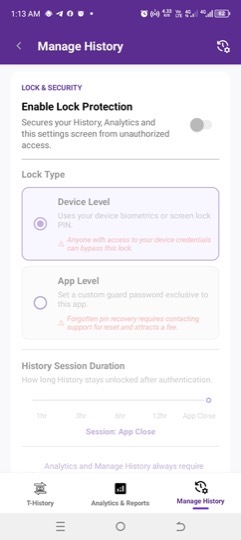
Your history and analytics show your whole business. App Lock asks for authentication when you open M-Agent, which covers your history and the Manage History screen. Analytics Lock asks again when you open Analytics. Each keeps its own session, from one hour up to App Close.
Choose Device Level to unlock with your phone's own biometrics or screen lock PIN, or App Level to set a 6-digit Guard PIN just for M-Agent. App Level also gives you an 8-word recovery phrase, so a forgotten PIN can be reset from the lock screen. If you lose both, support can give you a reset code.
Data Retention
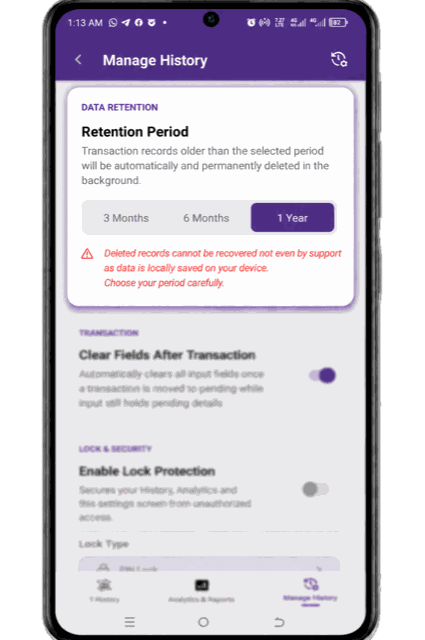
Choose whether M-Agent keeps records for three months, six months, or a year. Older records are deleted automatically in the background so storage stays under control.
Because your data lives on your own device, deleted records cannot be recovered by anyone, including us. Export anything you want to keep beyond your chosen period.
Import and Export History
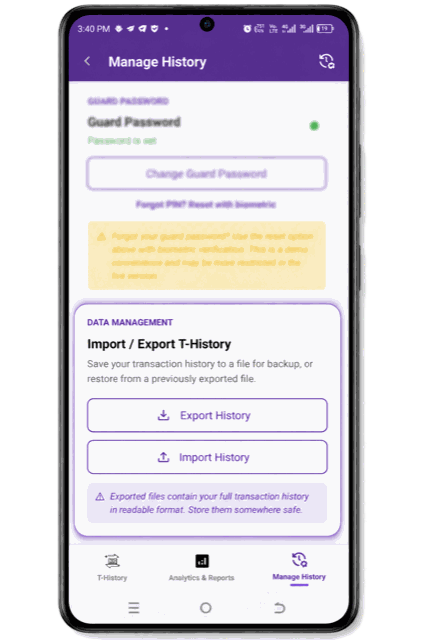
Save your full history to a file for backup, or to move it to a new phone. Exported files are protected, so a file that has been altered will not import. When restoring, choose whether to merge the file with your existing records or replace them.
Offline Access
M-Agent works completely offline. Your records live on your device and remain accessible with no connection at all.
Keep Screen Awake, Themes, and Field Sizing
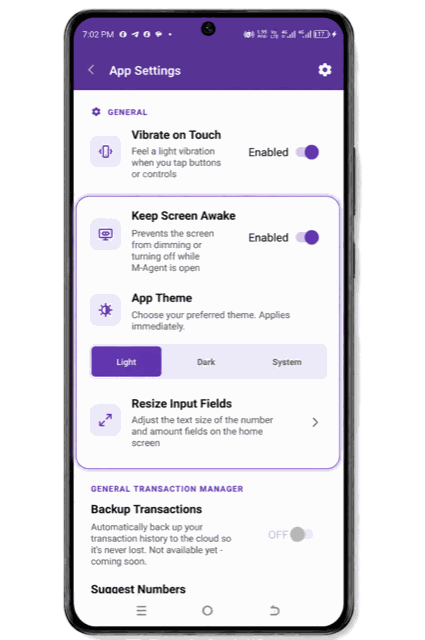
Small things that matter across a long day. Stop the screen dimming while M-Agent is open. Switch between light, dark, and your system theme. Resize the number and amount fields with a live preview until they read clearly at a glance, under Dashboard Customization.
Dashboard Customization
Make the home screen yours. Customize Buttons lets you swap the transaction buttons around, or replace one with another built in action or one of your custom menus. Operation Pool operations go on a button from the Operation Pool itself. The Custom Menu button stays where it is, and Reset to default puts everything back.
In the same place, resize the number and amount fields, fit the dashboard to your phone’s screen, use a single clear button for both fields, or reset to the original layout.
Coming Soon: Cloud Backup
Automatic backup of your transaction history to the cloud, so a lost or damaged phone does not take your records with it.